
Frequently asked questions
Here you will find our frequently asked questions and answers. If you can't find the information you are looking for, please contact Clean Cocos' customer service at support@cleancocos.com.
Customer service is closed on weekends and public holidays. If you require urgent assistance, please call our emergency phone in Norway (+47 33 39 89 43) or Sweden (+46 72 456 33 44).
For issues related to the app or payment, please contact support@appwash.com or chat directly with Appwash's customer service through the app.
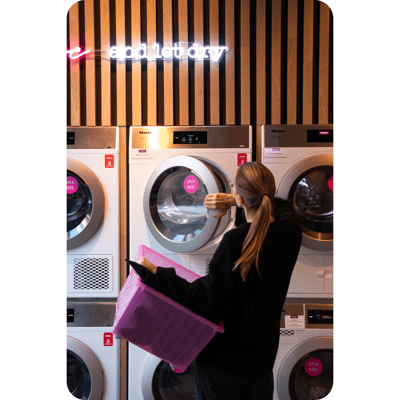
Clean Cocos is a self-service laundry. This means that there is no one working in the laundry to help you get started. We know that a lot can be confusing when you are going to use the laundry for the first time. Therefore, in this user guide, we have tried to make it a little easier for you who are going to use Clean Cocos's laundries for the first time.
WHERE IS CLEAN COCOS AVAILABLE?
DO YOU NEED A KEY OR CODE TO GET INTO THE LAUNDRY?
No, the doors to Clean Cocos's laundries are open to our customers throughout the entire opening hours. The laundries are under video surveillance, but you are responsible for the clothes you wash.
WHAT ARE CLEAN COCOS'S OPENING HOURS?
IS CLEAN COCOS OPEN ON HOLIDAYS?
Yes, Clean Cocos is open on holidays with opening hours from 06:00 to 22:00.
CAN I GET OUT OF THE LAUNDRY AFTER OPENING HOURS?
Yes, by opening the door from the inside of the laundry. The burglar alarm is activated after closing time.
CAN I WASH CLOTHES AFTER THE LAUNDRY'S CLOSING TIME?
No, the premises are alarmed and the burglar alarm is activated after closing time. If you wish to use the laundry outside opening hours, you can contact customer service.
IS THERE ANYONE WORKING IN THE LAUNDRY?
No, Clean Cocos is a self-service laundry without employees.
ARE THERE PARKING FACILITIES?
Clean Cocos does not have its own parking, but there is street parking in the nearby area.
IS THERE WIFI IN THE LAUNDRY?
Yes, we offer free wifi in all Clean Cocos laundries. You can use the code cleankokos or cleancocos.
WHAT IS THE WIFI PASSWORD?
The password is cleankokos or cleancocos.
DO I NEED TO BRING MY OWN LAUNDRY DETERGENT?
WHAT LAUNDRY DETERGENT DOES CLEAN COCOS USE?
At our laundries, we use fragrance-free and allergy-friendly detergent. We use the detergents Ecobrite Emulsion Clean and Ecobrite Detergent M from Ecolab. You can read more about the detergents we use here.
Why doesn't the detergent foam in the machine?
The detergent at Clean Cocos is automatically dosed in the correct amount. With automatic dosing of the right amount of detergent, and with the right amount of clothes in the machine, it should not foam when you start a machine. Overdosing and using too much detergent will fill the machine with foam.
Can I turn off the detergent Clean Cocos uses?
No, that is not possible. Any detergent you add will be in addition to what Clean Cocos uses.
CAN I BRING MY OWN LAUNDRY DETERGENT?
DOES CLEAN COCOS USE FABRIC SOFTENER?
No, Clean Kokos does not use fabric softener.
CAN I BRING MY OWN FABRIC SOFTENER?
Yes, you can add fabric softener in the drum.
Do I need to pre-treat stains?
Yes, all stains should be pre-treated with stain remover before clothes are washed in the machine.
HOW MUCH DOES A WASH COST?
A wash costs 75 kroner. All washing programs have the same price.
HOW MUCH DOES A DRY COST?
A dry costs 75 kroner. All drying programs have the same price.
HOW DO I PAY TO USE THE MACHINES?
CAN I PAY WITH COINS?
HOW DO I PAY WITH CARD?
HOW DO I PAY WITH THE APP?
WHAT DO I DO IF I HAVE PROBLEMS WITH PAYMENT?
Can I get a receipt?
If you need more information and a receipt beyond what you find in the app, you must contact Appwash's customer service at support@appwash.com.
Please include a screenshot of the transaction you want a receipt for. Alternatively, provide information about the machine number, user number, date and time of the transaction in the email.
This is where you can type question
This is where you can type answer to the question.
HOW DO I DOWNLOAD THE NEW APPWASH APP?
Download NEW appWash by Miele from the Apple App Store or Google Play Store.
We recommend downloading the app and completing your registration before visiting the laundromat for the first time.
DO I NEED TO CREATE A NEW ACCOUNT IF I ALREADY USE APPWASH?
Yes. The old appWash app has been replaced by NEW appWash by Miele. You must download the new app and create a new account, even if you already have an existing appWash account.
Your old login details will not work in the new app.
If you have remaining credit in your old account, you can transfer it to the new app.
HOW DO I REGISTER IN THE NEW APPWASH APP?
When registering with an email address, your verification code will be sent by email rather than SMS.
Check your spam or junk folder and make sure you entered the correct email address. You can also select Resend code.
If you still haven't received the code, contact support@appwash.com.
WHAT DO I DO IF I DON'T RECEIVE MY VERIFICATION CODE?
When registering with an email address, your verification code will be sent by email rather than SMS.
Check your spam or junk folder and make sure you entered the correct email address. You can also select Resend code.
If you still haven't received the code, contact support@appwash.com.
HOW DO I TRANSFER MY REMAINING BALANCE FROM THE OLD APPWASH APP?
You can transfer your remaining balance directly to the new app.
- Create an account in NEW appWash by Miele, selecting the same currency as in your old account.
- Select Yes when the Wallet Migration option appears or go to Account → Wallet Migration.
- Open your old appWash app and find your registered email address and AccountID in the migration message.
- Enter these details in the new app and select Look up.
- Check the amount and select Transfer now.
Your balance will then appear in your new appWash Wallet.
Keep the old app installed until your balance has been successfully transferred.
WHERE DO I FIND MY OLD APPWASH USER ID?
Open your old appWash app. The migration message displays your registered email address and AccountID.
Use this AccountID as your User ID when transferring your balance to the new app.
WHAT DO I DO IF MY BALANCE TRANSFER DOESN'T WORK?
Make sure you have entered the correct email address and AccountID from your old account.
Also check that you selected the same currency in the new app.
If the transfer still fails, contact support@appwash.com or use the in-app support chat.
HOW DO I FIND MY CLEAN COCOS LAUNDROMAT IN APPWASH?
Open Machines in the app and select Find Location.
Enter the five-digit appWash code displayed on the red sticker on any machine in the laundromat, then select Proceed.
Once your location is selected, you can choose between Washing and Drying and select the machine you want to use.
HOW DO I CHANGE LAUNDROMAT IN THE APP?
There are two ways:
Option 1: Account → Change Location (under "Your appWash") → Enter appWash Code → Proceed
Option 2: Machines Tab → Your Location → Change Location → Enter appWash Code → Proceed
WHAT ARE THE APPWASH CODES FOR THE DIFFERENT CLEAN COCOS LAUNDROMATS?
The following codes were used in the previous appWash app:
- Clean Cocos Frogner: 30820
- Clean Cocos Grünerløkka: 36810
- Clean Cocos Sagene: 37833
- Clean Cocos Tøyen: 38289
- Clean Cocos Bergen: 50817
- Clean Cocos Tromsø: 47991
- Clean Cocos Stockholm: 51393
CAN I CHECK IF THERE ARE AVAILABLE MACHINES IN THE LAUNDROMAT?
The app allows you to select your laundromat and view washing machines and dryers under Machines.
CAN I PRE-BOOK AN AVAILABLE MACHINE BEFORE VISITING THE LAUNDROMAT?
No.
HOW DO I PAY WITH THE NEW APPWASH APP?
There are two payment options:
- Wallet: Add credit to your appWash Wallet and use your balance to pay for washing or drying.
- Instant Pay: Pay directly for each wash or dry without topping up your Wallet.
Select the machine you want to use and choose your preferred payment method during checkout.
DO I NEED TO TOP UP MY APPWASH WALLET BEFORE WASHING?
No. With Instant Pay, you can pay directly for each wash or dry without adding money to your Wallet.
If you prefer to use prepaid credit, go to Wallet → Top Up, select an amount and follow the payment instructions.
IS THERE A MINIMUM AMOUNT I MUST TOP UP IN MY APPWASH WALLET?
The minimum is NOK 100.
HOW DO I START A WASHING MACHINE OR DRYER USING APPWASH?
- Load your laundry and close the machine door.
- Open the app and select the correct machine under Machines → Washing or Drying.
- Check that the machine number matches the number on the machine.
- Complete your payment using Wallet or Instant Pay.
- Select your preferred programme on the machine.
- Press the physical Start or Start/Stop button on the machine.
Always check that the machine has started before leaving the laundromat.
CAN I PAY WITHOUT DOWNLOADING THE APP?
Yes. You can pay directly at the payment terminal in our laundromats using a payment card or supported mobile payment method.
Downloading the app is optional.
WILL THE APP NOTIFY ME WHEN MY WASH OR DRY IS FINISHED?
Yes.
WHAT DO I DO IF I HAVE FORGOTTEN MY APPWASH PASSWORD?
Enter your email → Click "Forgot your password?" → Enter your email again → Click "Reset Password" → Enter the verification code received by email → Enter your new password → Confirm your new password → Click "Change Password" → Sign in with your email and new password.
CAN I GET A REFUND OF MY REMAINING APPWASH BALANCE?
If you have remaining credit in the old appWash app, you can transfer it to the new app using the Wallet Migration feature.
HOW LONG DOES IT TAKE TO RECEIVE A REFUND FROM APPWASH?
Up to 5–7 business days
WHAT DO I DO IF I HAVE DELETED MY APPWASH ACCOUNT?
Deleted accounts cannot be reactivated. However, users can register again using the same email address as before.
WHAT DO I DO IF MY PAYMENT FAILS OR THE MACHINE DOESN'T START?
First, check that you have selected the correct machine number and that your payment has been completed.
Make sure the machine door is properly closed, a programme has been selected, and you have pressed the physical Start or Start/Stop button.
If your payment fails, check your internet connection and payment status before trying again.
If the problem continues, contact appWash support through the app or by email at support@appwash.com.
HOW DO I CONTACT APPWASH CUSTOMER SERVICE?
For questions about registration, payments, account access, or balance transfers, contact appWash customer service:
Email: support@appwash.com
In-app chat: Open the support chat using the speech-bubble icon with a question mark on the Machines screen.
Include your registered email address and a brief description of the issue. For machine-related problems, also include the laundromat location and machine number.
WHAT IS THE SIZE OF THE MACHINES?
The machines at Clean Cocos hold 8 kilos.
DO YOU HAVE AN OVERVIEW OF CLEAN KOKOS'S WASHING AND DRYING PROGRAMS?
CAN I DYE TEXTILES IN YOUR MACHINES?
CAN I WASH DOWN JACKET IN YOUR MACHINES?
CAN I WASH HARNESS OR HORSE BLANKETS IN YOUR MACHINES?
CAN I WASH MOPS IN YOUR MACHINES?
CAN I WASH SINGLE DUVET IN YOUR MACHINES?
CAN I WASH DOUBLE DUVET IN YOUR MACHINES?
CAN I WASH MATTRESS TOPPER IN YOUR MACHINES?
CAN I WASH MATTRESS TOPPER COVERS IN YOUR MACHINES?
Can I use only the washing machine?
Yes, you can use only the washing machine.
The bottom row of machines are washing machines. The washing machines are located under the dryers.
Can I use only the tumble dryer?
Yes, you can use only the tumble dryer.
The top row of machines are dryers. The dryers are located above the washing machines.
WHERE ARE THE WASHING MACHINES?
The bottom row of machines are washing machines. The washing machines are located under the dryers.
WHERE ARE THE DRYERS?
The top row of machines are dryers. The dryers are located above the washing machines..
HOW DO I OPEN THE WASHING MACHINE?
HOW DO I OPEN THE DRYER?
Pull the handle of the dryer. The handle is marked in yellow, and located on the right side of the drum.
DO I NEED TO CLEAN THE LINT FILTER BEFORE USING THE DRYER?
Yes, to prevent program interruptions and to extend the drying time.
WHERE DO I TURN ON THE MACHINE?
HOW DO I START THE MACHINE IF THE MIELE LOGO IS LIT IN THE DISPLAY?
HOW DO I START A MACHINE WITH THE APP?
HOW DO I START A MACHINE WITH THE CARD TERMINAL?
CAN I CHANGE THE LANGUAGE ON THE MACHINE?
HOW DO I GET MORE PROGRAM OPTIONS?
A MACHINE IS AVAILABLE IN THE LAUNDRY, BUT MARKED AS OCCUPIED IN THE APP. WHAT DO I DO?
Send an email to info@cleankokos.rent. Feel free to include the machine number.
WHAT DO I DO IF THE PROGRAM IS INTERRUPTED AND AN ERROR MESSAGE IS DISPLAYED?
Chat with Appwash's customer service through the app. Go to history and select the machine you had problems with, press send message and describe the problem. Alternatively, send an email to support@appwash.com or info@cleankokos.rent. Please include machine number, user number, date and time.
You can also start a new program, and request a refund for the failed transaction by going to history and selecting the transaction you had problems with, press send message and describe the problem. Alternatively, send an email to support@appwash.com or info@cleankokos.rent. Please include machine number, user number, date and time.
CAN I OPEN THE DOOR TO THE WASHING MACHINE DURING THE DRYING PROGRAM?
WHY DOES THE LENGTH OF THE DRYING PROGRAM CHANGE?
CAN I OPEN THE DOOR TO THE DRYER DURING THE DRYING PROGRAM?
WHY DOES THE LENGTH OF THE WASH PROGRAM CHANGE?
What do I do if the washing program is interrupted, but the clothes are not finished washing?
If the washing program is interrupted or finished, and the clothes are not fully washed, you can start a new washing program.
Request a refund for the failed wash by going to history and selecting the transaction you had problems with, press send message and describe the problem. Alternatively, send an email to support@appwash.com or info@cleankokos.rent. Please include machine number, user number, date and time.
What do I do if the washing program is interrupted or finished, but the clothes are not fully spun?
If the program is interrupted, and the clothes are not fully spun, you can start the pump/spin program. This program is suitable if you need to spin the textiles further after a wash.
Request a refund for the failed wash by going to history and selecting the transaction you had problems with, press send message and describe the problem. Alternatively, send an email to support@appwash.com or info@cleankokos.rent. Please include machine number, user number, date and time.
What do I do if the drying program is interrupted, but the clothes are not fully dried?
If the program is interrupted, but the clothes are not fully dried, you can start a new program.
Request a refund for the failed drying by going to history and selecting the transaction you had problems with, press send message and describe the problem. Alternatively, send an email to support@appwash.com or info@cleankokos.rent. Please include machine number, user number, date and time.
What do I do if the drying program is interrupted, and there is an error message saying the clothes are too dry/there are no clothes in the machine?
If this error message comes up when the drying program is interrupted, it means that the clothes are too dry or too light for the dryer to register them.
If you still want to dry the clothes further, you can set the drying program to Time Program Hot.
Request a refund for the failed drying by going to history and selecting the transaction you had problems with, press send message and describe the problem. Alternatively, send an email to support@appwash.com or info@cleankokos.rent. Please include machine number, user number, date and time.
WHAT DO I DO IF I EXPERIENCE AN UNSATISFACTORY WASHING OR DRYING RESULT?
Chat with Appwash's customer service through the app. Go to history and select the machine you had problems with, press send message and describe the problem. Alternatively, send an email to support@appwash.com or info@cleankokos.rent. Please include machine number, user number, date and time.
You can also start a new program, and request a refund for the failed transaction by going to history and selecting the transaction you had problems with, press send message and describe the problem. Alternatively, send an email to support@appwash.com or info@cleankokos.rent. Please include machine number, user number, date and time.
WHAT DO I DO IF THE PROGRAM IS FINISHED AND THE DOOR OF THE WASHING MACHINE WON'T OPEN?
The door of the machine does not open automatically when the washing program is finished. As soon as a program can be ended, the light of the start/stop sensor button pulses. Touch the stop sensor button. Open the door manually by pulling the handle of the washing machine. The handle is marked in yellow, and is located on the left side of the drum.
WHAT DO I DO IF THE PROGRAM IS FINISHED, BUT THE WASHING MACHINE CONTINUES TO ROTATE AND ANTI-CREASE IS DISPLAYED?
After the program ends, the drum rotates at intervals. This reduces creasing if the textiles are not immediately removed from the drum. The drum continues to move up to 30 minutes after the program ends. The washing machine can be opened during Anti-crease. Touch the stop sensor button. Open the door manually by pulling the handle of the washing machine. The handle is marked in yellow, and is located on the left side of the drum.
WHAT DO I DO IF THE WASHING PROGRAM IS FINISHED, BUT COOLING/COMFORT COOLING IS DISPLAYED?"
As a protection against scalding, the machine door cannot be opened if the temperature of the washing water is above 55 degrees. After the program ends or the program is interrupted, the following message is displayed "Cooling or comfort cooling". To open the door, wait until the temperature in the drum has dropped and the display has turned off. This can take up to 15 minutes. As soon as the program can be ended, the light of the start/stop sensor button pulses. Touch the stop sensor button. Open the door manually by pulling the handle of the washing machine. The handle is marked in yellow, and is located on the left side of the drum.
WHAT DO I DO IF THE DOOR TO THE WASHING MACHINE STILL WON'T OPEN?
If the drain is blocked or in case of a power outage, you need to open the cover to the drainage system. The cover is located at the bottom left corner of the washing machine.
If the drain is blocked, there may be a larger amount of water (max. 30 l.) in the machine. To empty the drum of water, you need to press the lever of the emergency switch downwards. You must keep it down until no more water is running out.
To open the door, you need to open the door lock (yellow lever) using a key, pen, pencil, or screwdriver. Place the tool into the yellow lever, and push it down. Once this is done, you can open the door and take out your clothes.
WHAT DO I DO IF THE PROGRAM IS FINISHED AND THE DOOR OF THE DRYER WON'T OPEN?
WHAT DO I DO IF THE PROGRAM IS FINISHED, BUT THE DRYER CONTINUES TO ROTATE AND ANTI-CREASE IS DISPLAYED?
If anti-crease is selected, the drum rotates at intervals. This reduces creasing if the textiles are not immediately removed from the drum. The drum continues to move up to 30 minutes after the program ends, to avoid creasing. Open the machine by pulling the handle of the dryer. The handle is marked in yellow, and is located on the right side of the drum.
WHAT DO I DO IF THE DRYING PROGRAM IS FINISHED, BUT COOLING/COMFORT COOLING IS DISPLAYED?
There is no error, even though the drying process is still ongoing. The textiles are still being cooled, and the program is almost over. You can remove the textiles by opening the door manually, or let them cool in the dryer until the end of the program. Open the machine by pulling the handle of the dryer. The handle is marked in yellow, and is located on the right side of the drum.
Is there paper towel in the premises?
No, we do not have paper towels on the premises. We recommend that you bring a cloth or for example paper or wet wipes if you wish to clean the machine before use.
HOW OFTEN IS THE PREMISES CLEANED?
Clean Cocos has employees who clean the premises several times a week.
How often are the machines cleaned?
Yes, cleaning is performed on the machines several times a week. We also perform maintenance washes at 90 degrees at regular intervals.
Do I need to empty my pockets and shake out my clothes before washing or drying?
Yes, empty your pockets and shake out your garments before washing your clothes at Clean Cocos. Remove any items left in the machine after you have used it. Dispose of any waste in the general waste in the laundries.
Do I need to clean the lint filter before drying?
Do I need to empty the rubber ring in the washing machine after use?
Yes, check and clean the rubber ring on your washing machine after the wash is done, it will be a more pleasant experience for the next person using the machine.
WHAT HAPPENS IF I DON'T PICK UP MY CLOTHES WHEN THE PROGRAM IS FINISHED?
We do not take responsibility for your clothes, and you risk that the machines are emptied by other customers when the program is finished. There is a basket for uncollected and forgotten clothes in the room.
WHAT DO I DO IF I HAVE FORGOTTEN CLOTHES IN THE ROOM?
There is a basket for uncollected and forgotten clothes in the room.
Is the laundry room under video surveillance?
Yes, the laundry room is under video surveillance, but you are responsible for your own clothes when you use our laundries.
Can I get compensation if my clothes are stolen in the laundry room?
Can I get compensation if my clothes are damaged in the laundry room?
No, Clean Cocos is not liable for compensation. Our liability for damages is limited to the price of running a washing machine or dryer.
HOW DO I CONTACT APPWASH?
Send an email to support@appwash.com. Customer service is open Monday to Friday from 09:00 to 16:00. Customer service is closed on weekends and holidays.
Or chat with Appwash's customer service through the app. Go to history or prepaid and send a message. Appwash also responds to messages via chat on weekends and holidays.
Please include laundromat, machine number, user number, date and time.
HOW DO I CONTACT CLEAN COCOS?
Contact Clean Cocos customer service at support@cleancocos.com. Customer service is open Monday to Friday from 09:00 to 16:00 and is closed on weekends and public holidays.
For urgent assistance outside opening hours, please call our emergency phone in Norway (+47 33 39 89 43) or Sweden (+46 72 456 33 44).
Please include the laundromat location, machine number, user number, date and time when contacting us.
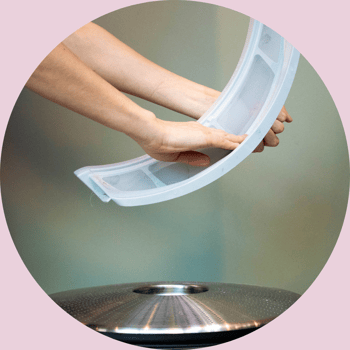
We recommend that you empty the lint filter in the drum before you start a drying cycle. Feel free to do it also after your drying cycle is finished, it will be a more pleasant experience for the next person using the machine. Take the grey lint filter out of the machine and empty it of lint as needed. Throw the lint in the general waste in the laundries, do not throw lint in the sink.
We recommend that you empty your pockets and shake out your garments before washing your clothes at Clean Cocos. Also, check how the rubber ring on your washing machine looks after the wash is done, it will be a more pleasant experience for the next person using the machine. Throw the waste in the general waste in the laundries.